The 802.11 standards define how wireless local area networks operate. Developed and maintained by the Institute of Electrical and Electronics Engineers, commonly known as IEEE, these standards specify the protocols and technologies that enable devices to communicate wirelessly. For the CompTIA A+ 1201 exam, you must understand the various 802.11 standards, their capabilities, and how they differ from one another.
The term "Wi-Fi" is often used interchangeably with 802.11, but they are not exactly the same thing. Wi-Fi is a trademark owned by the Wi-Fi Alliance, an industry organization that certifies products for interoperability. When a device carries the Wi-Fi logo, it has been tested and certified to work with other Wi-Fi devices. The underlying technology that makes Wi-Fi possible comes from the IEEE 802.11 standards.
Understanding these standards is essential for IT professionals because wireless networks are ubiquitous in both home and enterprise environments. Knowing which standard a device supports helps you troubleshoot connectivity issues, plan network upgrades, and ensure compatibility between different equipment.
The Evolution of 802.11 Standards
A Brief History
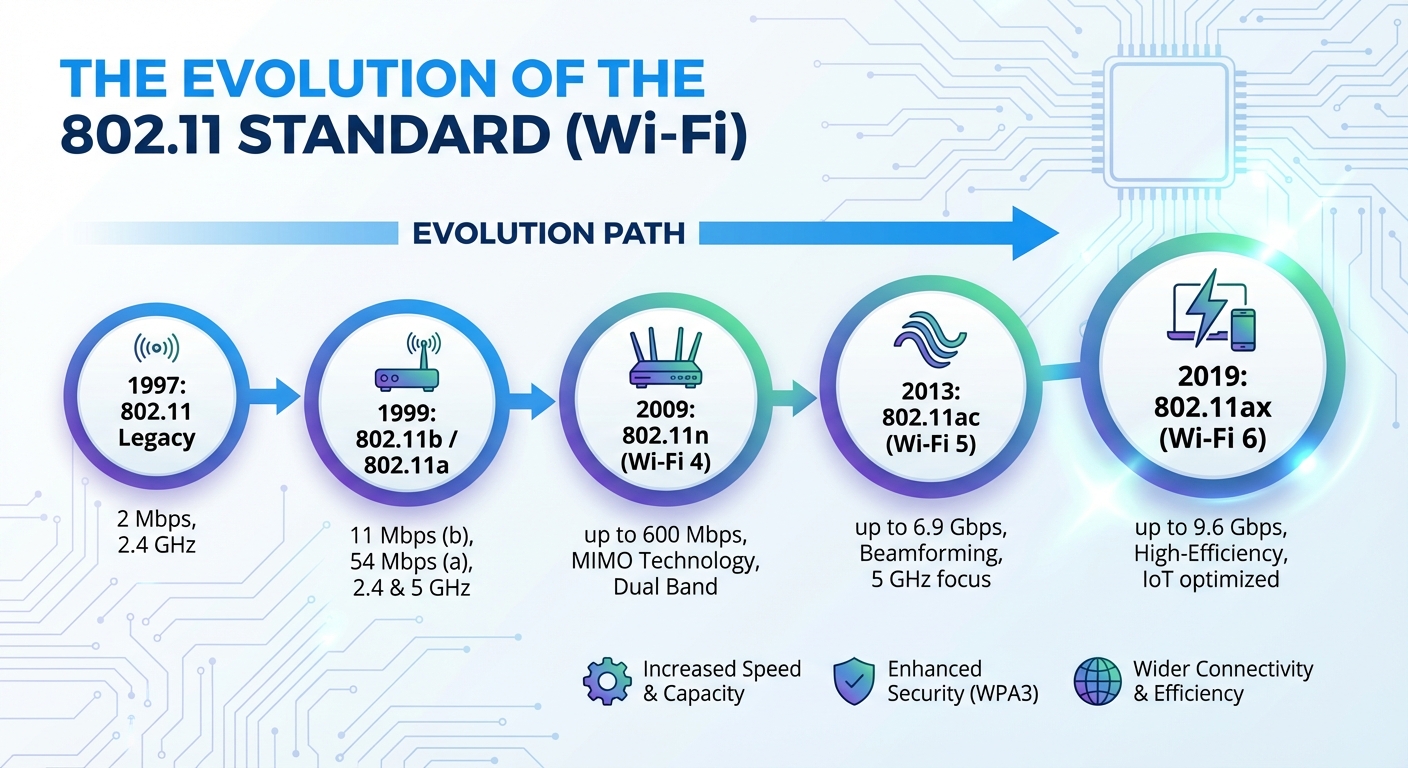
The original 802.11 standard was released in 1997 and provided data rates of 1 to 2 Mbps in the 2.4GHz band. While revolutionary at the time, this initial standard was too slow for practical networking applications. The IEEE quickly developed improved versions, leading to the alphabet soup of standards we have today.
Over the past two decades, wireless speeds have increased dramatically. The original 2 Mbps has grown to theoretical maximums exceeding 40 Gbps with the latest standards. This progression reflects advances in radio technology, signal processing, and our understanding of how to efficiently use the radio spectrum.
The Naming Problem
For many years, 802.11 standards were identified only by their letter designations, such as 802.11a, 802.11b, 802.11g, 802.11n, and 802.11ac. This naming convention confused consumers who had no way of knowing that 802.11ac was faster than 802.11n, or that 802.11a and 802.11b were released around the same time despite their alphabetical order.
In 2018, the Wi-Fi Alliance introduced a simplified naming scheme to help consumers understand the generational differences between standards. Under this system, 802.11n became Wi-Fi 4, 802.11ac became Wi-Fi 5, and 802.11ax became Wi-Fi 6. This consumer-friendly naming makes it easier to understand that Wi-Fi 6 is newer and faster than Wi-Fi 5, just as you would expect with version numbers.
EXAM TIP: You must know both naming conventions for the exam. Be prepared to match the 802.11 letter designations with their Wi-Fi generation numbers.
Legacy Standards: 802.11, 802.11a, and 802.11b
The Original 802.11 (1997)
The original 802.11 standard, sometimes called 802.11-1997 or 802.11 legacy, was the first wireless LAN standard. It operated in the 2.4GHz band and supported maximum data rates of only 1 to 2 Mbps. The standard used two spread spectrum technologies: Frequency Hopping Spread Spectrum (FHSS) and Direct Sequence Spread Spectrum (DSSS).
This original standard is now obsolete and no longer found in production equipment. However, understanding that it existed helps contextualize the rapid improvements that followed.
802.11b (1999)
The 802.11b standard was released in 1999 and became the first commercially successful Wi-Fi technology. Operating in the 2.4GHz band, it increased maximum data rates to 11 Mbps, making it practical for real-world networking applications.
Key characteristics of 802.11b include operation in the 2.4GHz frequency band, a maximum data rate of 11 Mbps, use of Direct Sequence Spread Spectrum modulation, support for channels 1 through 14 depending on regulatory domain, an indoor range of approximately 115 feet, and an outdoor range of approximately 460 feet.
The 802.11b standard gained widespread adoption because it offered reasonable speeds at affordable prices. However, operating in the crowded 2.4GHz band meant susceptibility to interference from other devices like cordless phones and microwave ovens.
802.11a (1999)
The 802.11a standard was also released in 1999, the same year as 802.11b, despite its earlier letter designation. Unlike 802.11b, this standard operated in the 5GHz band and offered significantly faster speeds of up to 54 Mbps.
Key characteristics of 802.11a include operation in the 5GHz frequency band, a maximum data rate of 54 Mbps, use of Orthogonal Frequency Division Multiplexing (OFDM) modulation, support for up to 23 non-overlapping channels, an indoor range of approximately 50 feet, and incompatibility with 802.11b devices.
Despite its superior speed, 802.11a did not achieve the same commercial success as 802.11b initially. The shorter range due to the higher frequency, higher equipment costs, and incompatibility with the more popular 802.11b devices limited its adoption. However, the 5GHz band offered less interference and more available channels, making 802.11a popular in enterprise environments.
EXAM TIP: Remember that 802.11a and 802.11b were released in the same year (1999) despite their letter designations. They are not compatible with each other because they use different frequency bands.
802.11g: Bridging the Gap
Overview
Released in 2003, the 802.11g standard combined the best features of 802.11a and 802.11b. It brought the faster 54 Mbps speeds of 802.11a to the 2.4GHz band used by 802.11b, while maintaining backward compatibility with 802.11b devices.
Key characteristics of 802.11g include operation in the 2.4GHz frequency band, a maximum data rate of 54 Mbps, use of OFDM modulation for higher speeds, backward compatibility with 802.11b devices, an indoor range of approximately 125 feet, and support for only 3 non-overlapping channels (1, 6, 11).
Backward Compatibility Considerations
The backward compatibility of 802.11g was both a strength and a weakness. While it allowed organizations to gradually upgrade their networks without replacing all devices at once, the presence of slower 802.11b devices on a network could significantly reduce overall performance.
When an 802.11b device connects to an 802.11g network, the access point must use protection mechanisms to ensure the older device can communicate. These mechanisms add overhead and reduce the efficiency of the entire network. This phenomenon became a recurring theme in subsequent standards, where backward compatibility came at a performance cost.
802.11n (Wi-Fi 4): The MIMO Revolution
Overview
The 802.11n standard, ratified in 2009 and marketed as Wi-Fi 4, represented a major leap forward in wireless technology. It introduced Multiple Input Multiple Output (MIMO) antenna technology and could operate in both the 2.4GHz and 5GHz bands, making it the first true dual-band standard.
Key characteristics of 802.11n include operation in both 2.4GHz and 5GHz frequency bands, a maximum data rate of 600 Mbps, use of MIMO technology with up to 4 spatial streams, support for 40MHz channel bonding, backward compatibility with 802.11a, 802.11b, and 802.11g, and significantly improved range over previous standards.
MIMO Technology Explained
MIMO, which stands for Multiple Input Multiple Output, uses multiple antennas on both the transmitter and receiver to improve performance. Instead of sending data over a single radio path, MIMO creates multiple simultaneous data streams, dramatically increasing throughput.
The concept works by exploiting multipath propagation. In a typical indoor environment, wireless signals bounce off walls, furniture, and other objects, creating multiple paths between the transmitter and receiver. Traditional wireless systems treated this multipath interference as a problem to be overcome. MIMO systems instead use sophisticated signal processing to separate these multiple paths and use them as independent data channels.
The number of spatial streams is often expressed in a format like 2x2 or 4x4, indicating the number of transmit and receive antennas. A 2x2 MIMO system has two transmit antennas and two receive antennas, supporting up to two spatial streams. A 4x4 MIMO system can support up to four spatial streams, achieving the maximum 600 Mbps throughput of 802.11n.
Channel Bonding
The 802.11n standard introduced channel bonding, which combines two adjacent 20MHz channels into a single 40MHz channel. This effectively doubles the available bandwidth, significantly increasing throughput.
However, channel bonding in the 2.4GHz band is problematic. Since only three non-overlapping 20MHz channels exist (1, 6, and 11), bonding two channels together leaves very little room for other networks. In practice, 40MHz channels should only be used in the 5GHz band where more spectrum is available.
EXAM TIP: 802.11n (Wi-Fi 4) was the first standard to support both 2.4GHz and 5GHz bands, making it the first true dual-band Wi-Fi standard.
802.11ac (Wi-Fi 5): Gigabit Wireless
Overview
The 802.11ac standard, ratified in 2013 and marketed as Wi-Fi 5, was designed to deliver gigabit-class wireless speeds. Operating exclusively in the 5GHz band, it introduced wider channels, more spatial streams, and advanced modulation techniques.
Key characteristics of 802.11ac include operation exclusively in the 5GHz frequency band, a maximum data rate of approximately 3.5 Gbps, support for up to 8 spatial streams, channel widths of 20, 40, 80, and 160 MHz, use of 256-QAM modulation, introduction of Multi-User MIMO (MU-MIMO), and backward compatibility with 802.11a and 802.11n (5GHz).
Wave 1 and Wave 2
The Wi-Fi Alliance released 802.11ac certification in two phases, known as Wave 1 and Wave 2.
Wave 1 products, released starting in 2013, supported channel widths up to 80MHz, up to 3 spatial streams, and maximum speeds of approximately 1.3 Gbps. These products established 802.11ac in the market and delivered significant improvements over 802.11n.
Wave 2 products, released starting in 2016, added support for 160MHz channels, up to 4 spatial streams in consumer products (8 in enterprise), MU-MIMO for simultaneous multi-client communication, and maximum speeds of approximately 3.5 Gbps. Wave 2 represented the full implementation of the 802.11ac specification.
Multi-User MIMO (MU-MIMO)
Traditional MIMO, now called Single-User MIMO (SU-MIMO), can only communicate with one client at a time. Even though an access point might have multiple antennas and support multiple spatial streams, all of those streams go to a single device during each transmission.
MU-MIMO, introduced with 802.11ac Wave 2, allows an access point to transmit to multiple clients simultaneously using different spatial streams. For example, an access point with four antennas could communicate with four single-antenna clients at the same time, or two dual-antenna clients simultaneously.
This technology significantly improves network efficiency, especially in environments with many connected devices. Instead of each device waiting its turn to communicate, multiple devices can receive data at the same time.
However, 802.11ac MU-MIMO only works in the downlink direction, meaning from the access point to clients. Uplink transmissions still occur one device at a time. Additionally, MU-MIMO requires clients that support the technology to realize its benefits.
256-QAM Modulation
The 802.11ac standard introduced 256-QAM (Quadrature Amplitude Modulation), which encodes more data into each transmitted symbol compared to the 64-QAM used in previous standards. This increases efficiency and throughput but requires a cleaner signal with less noise.
The jump from 64-QAM to 256-QAM provides approximately 33% more data capacity per symbol. However, the receiver must be able to distinguish between 256 different signal states instead of just 64, requiring a higher signal-to-noise ratio for reliable communication.
EXAM TIP: 802.11ac (Wi-Fi 5) operates only in the 5GHz band. It does not support 2.4GHz operation.