A mail server is a system that sends, receives, stores, and routes email messages across networks. Mail servers act as digital post offices, handling the transmission of messages between users whether they're on the same network or across the globe. Organizations run their own mail servers for internal communication and security control, while many businesses now rely on cloud-hosted email services like Microsoft 365 or Google Workspace.
A complete email infrastructure typically involves multiple server roles working together: sending outbound mail, receiving inbound mail, and providing mailbox access to end users.
Email Protocols
Email relies on several protocols, each serving a specific function in the message lifecycle.
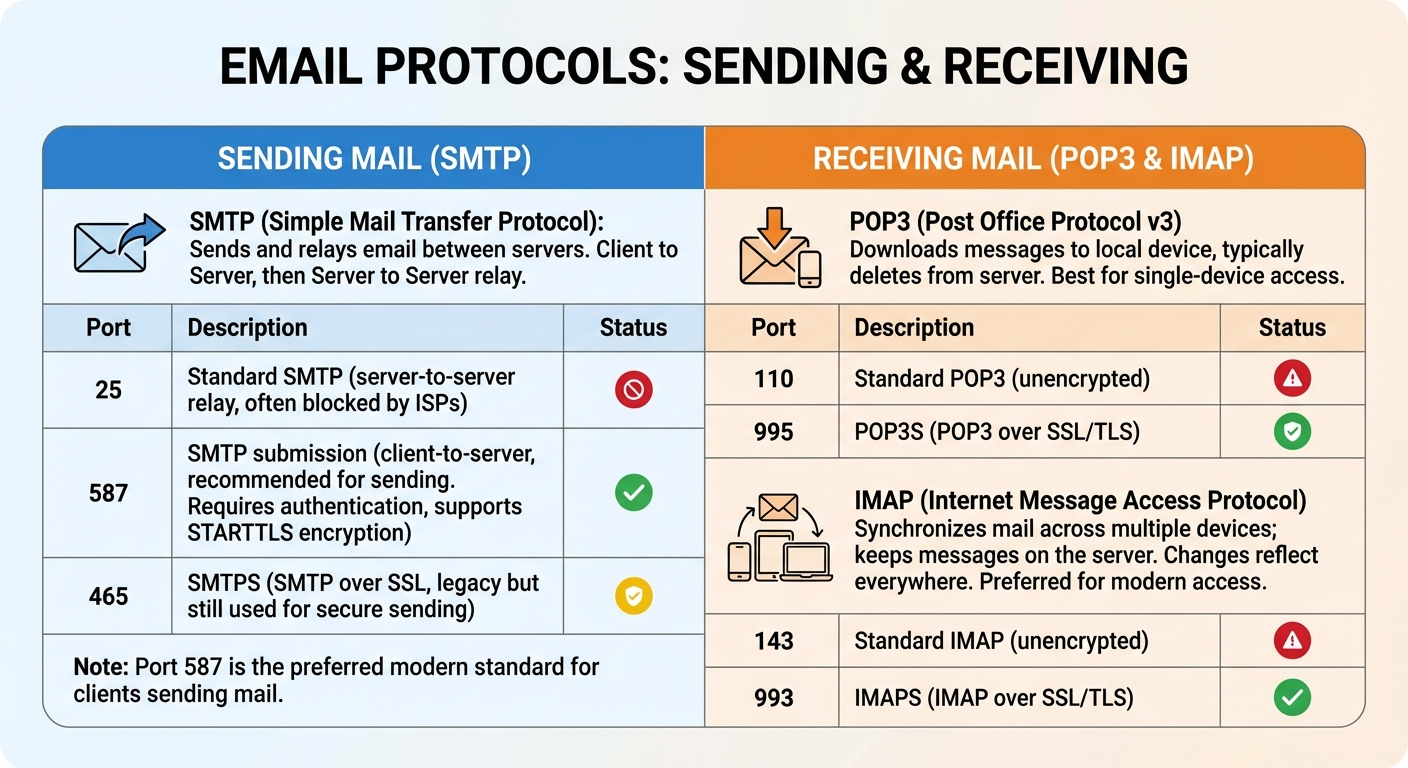
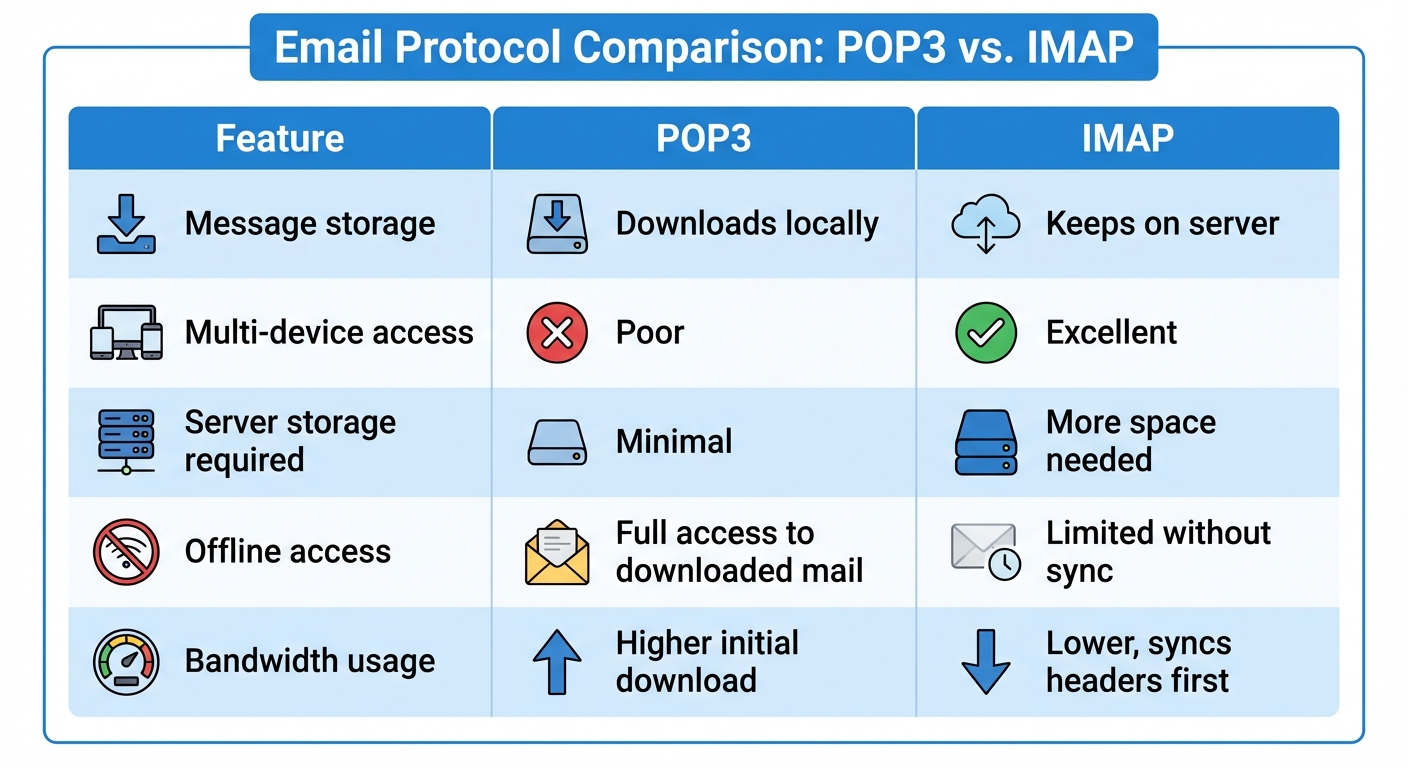
Protocol Comparison
Mail Server Components
Enterprise mail systems consist of several components working together.
MTA (Mail Transfer Agent)
The MTA routes messages between servers using SMTP. When you send an email to someone at another domain, your MTA looks up the recipient's mail server and delivers the message. Popular MTAs include Microsoft Exchange, Postfix, and Sendmail.
MDA (Mail Delivery Agent)
The MDA receives mail from the MTA and places it in the correct user mailbox. It handles local delivery and mailbox storage.
MUA (Mail User Agent)
The MUA is the email client that users interact with—applications like Microsoft Outlook, Mozilla Thunderbird, Apple Mail, or webmail interfaces. The MUA retrieves mail via POP3 or IMAP and sends mail via SMTP.
Message Flow Example
- User composes email in Outlook (MUA)
- Outlook sends message via SMTP to organization's mail server
- The MTA queries DNS for the recipient's MX record
- MTA relays message to recipient's mail server via SMTP
- Recipient's MDA delivers message to the mailbox
- Recipient's MUA retrieves message via IMAP
DNS Records for Email
Mail servers rely on specific DNS records to function properly.
MX Records
MX (Mail Exchange) records specify which servers handle email for a domain. Each MX record includes a priority value; lower numbers indicate higher priority. If the primary server is unavailable, mail routes to the next priority server.
Example MX records for example.com:
Mail servers attempt delivery to mail1 first. If it's unreachable, they try mail2.
Other Important Records
A/AAAA Records: Map mail server hostnames to IP addresses
PTR Records: Reverse DNS lookup; many mail servers reject messages from IPs without valid PTR records
SPF Records: Specify which servers are authorized to send mail for the domain
DKIM Records: Contain public keys for verifying email signatures
DMARC Records: Define policies for handling messages that fail SPF or DKIM checks
Email Security
Email is a primary target for attacks. Understanding security measures helps protect users and organizations.
Authentication Protocols
SPF (Sender Policy Framework) publishes a DNS TXT record listing authorized sending servers. Receiving servers check if incoming mail comes from an approved source.
DKIM (DomainKeys Identified Mail) adds a digital signature to outgoing messages. Receiving servers verify the signature using the sender's public key in DNS, confirming the message wasn't altered in transit.
DMARC (Domain-based Message Authentication, Reporting, and Conformance) builds on SPF and DKIM, telling receiving servers what to do with messages that fail authentication (none, quarantine, or reject) and where to send reports.
Encryption
TLS (Transport Layer Security) encrypts the connection between mail servers and between clients and servers. STARTTLS upgrades an unencrypted connection to encrypted on standard ports.
S/MIME and PGP provide end-to-end encryption, securing message content so only the intended recipient can read it.