A computer power supply receives high-voltage AC power from the wall and converts it into lower-voltage DC power that computer components can safely use. Inside a desktop computer, the most common power supply output voltages are 3.3V, 5V, and 12V.
These are called DC output voltages. DC stands for direct current. Unlike the AC power from a wall outlet, DC power flows in one direction and is used by the motherboard, CPU, RAM, storage drives, fans, and expansion cards.
For CompTIA A+ Core 1, students should understand that a power supply does not send one single voltage to every component. Different parts of the computer need different voltages, and the PSU provides those voltages through different cables and connectors.
Input Voltage vs. Output Voltage
Input voltage is what the power supply receives from the wall. This is where terms like 110–120 VAC and 220–240 VAC apply.
Output voltage is what the power supply sends to the computer components. This is where 3.3V, 5V, and 12V apply.
For example, a power supply may receive 120V AC from a wall outlet, but it does not send 120V directly to the motherboard. Instead, it converts that power into lower DC voltages. Those lower voltages are safer and usable by computer hardware.
A technician should keep these two ideas separate:
Input power comes from the wall into the PSU.
Output power goes from the PSU to the computer components.
What Is a Voltage Rail?
A rail is a power supply output path that provides a specific voltage. When people talk about the 3.3V rail, 5V rail, or 12V rail, they are talking about different output voltage lines from the power supply.
Each rail is designed to power certain types of components. Modern desktop computers rely heavily on the 12V rail, but the 3.3V and 5V rails are still important for many motherboard and peripheral functions.
The power supply must provide stable voltage. If a rail is unstable, too weak, or failing, the computer may crash, shut down, fail to boot, or behave unpredictably.
The 3.3V Rail
The 3.3V rail provides low-voltage power for parts of the motherboard and some smaller electronic components.
Many modern components use very low voltages internally. The motherboard may receive 3.3V from the power supply and then regulate or distribute that power to smaller circuits.
The 3.3V rail may be used by motherboard logic, chipset-related functions, some expansion card functions, and certain storage or interface electronics. M.2 devices commonly receive power through the motherboard, and that power is often based around low-voltage motherboard power delivery.
Students do not need to memorize every tiny circuit that uses 3.3V. The key idea is that 3.3V is used for lower-power electronics and motherboard-level functions.
The 5V Rail
The 5V rail powers many peripheral and logic-related devices.
USB is one of the easiest examples. Traditional USB power is 5V, which is why USB ports can power devices such as flash drives, keyboards, mice, webcams, phone charging cables, and small accessories.
Some storage devices also use 5V. For example, many 2.5-inch SATA SSDs and laptop-sized hard drives use 5V power. Some electronics on drives and other devices may also use 5V.
The 5V rail was more heavily used in older computers than it is in many modern high-performance systems, but it is still important. If the 5V rail has a problem, USB devices, storage devices, or motherboard functions may behave incorrectly.
The 12V Rail
The 12V rail is the most important power rail in many modern desktop computers.
High-power components usually depend on 12V power. This includes the CPU power connector, PCIe graphics card power connectors, fans, pumps, and some storage drive motors.
The CPU does not use 12V directly in its final form. Instead, the motherboard receives 12V from the power supply and uses voltage regulation modules, often called VRMs, to step that voltage down to the much lower voltage the CPU actually needs.
Graphics cards work in a similar way. A GPU may receive 12V from the PCIe slot and PCIe power cables, then regulate that power for the graphics processor, memory, and other onboard components.
Because CPUs and GPUs can require a lot of power, the 12V rail is extremely important when choosing a power supply.
What the 24-Pin Motherboard Connector Carries
The 24-pin ATX motherboard connector is the main power connector for the motherboard. It carries multiple voltages, including 3.3V, 5V, and 12V, along with ground and control signals.
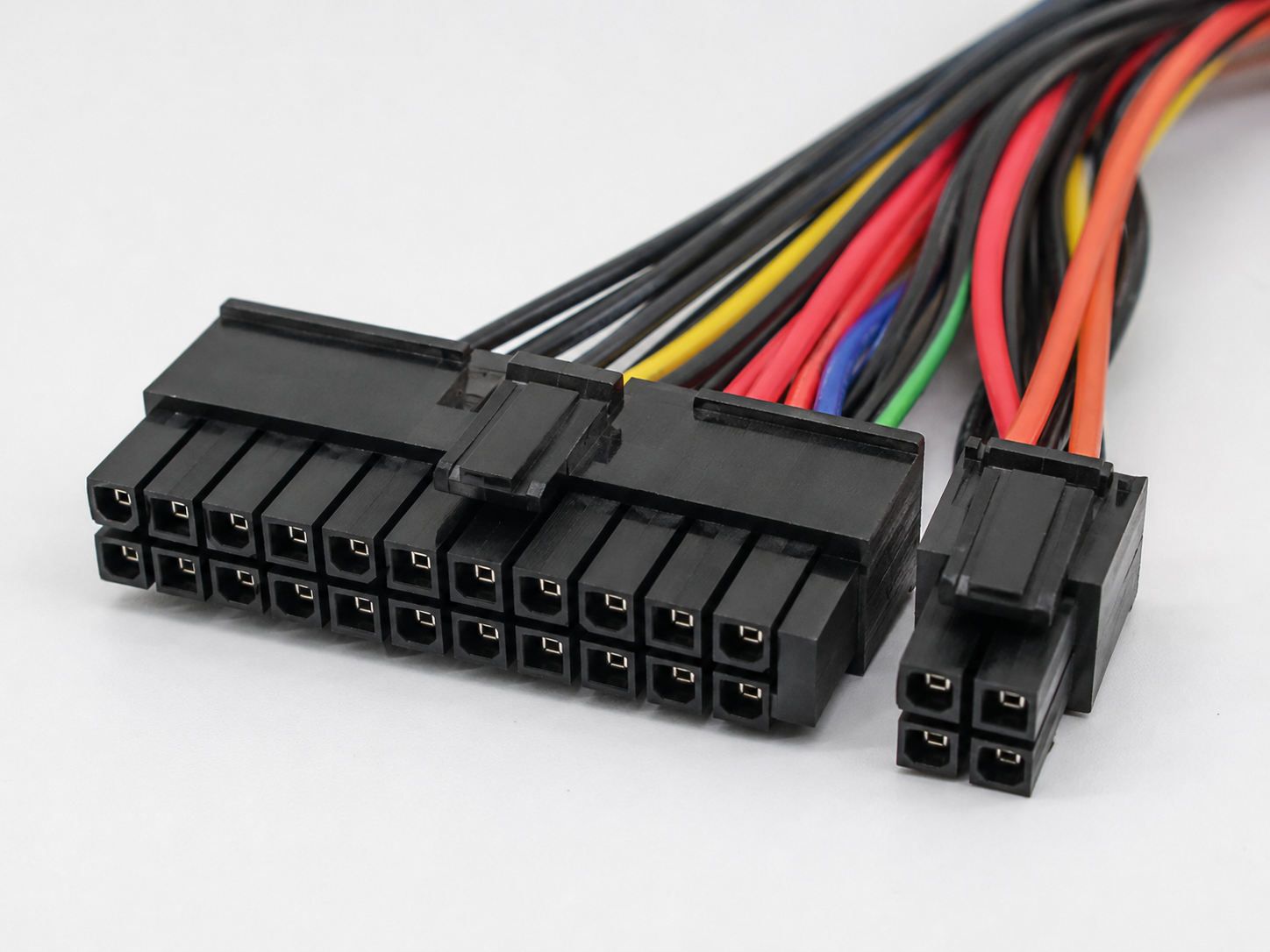
This connector helps power the motherboard and allows the PSU and motherboard to communicate basic power states. For example, the motherboard can signal the power supply to turn on when the user presses the power button.
A loose or partially connected 24-pin connector can cause a system to fail to power on, restart randomly, or behave unpredictably.
CPU Power and 12V
The CPU usually receives power through a separate CPU power connector near the processor socket. This connector is commonly a 4-pin, 8-pin, or 4+4-pin CPU power connector.
This cable provides 12V power to the motherboard’s CPU power delivery system.