Every time you send an email, stream a video, browse a website, or play an online game, your data must travel across networks to reach its destination. But how does that data actually get there? The answer lies in the transport layer of the networking model, where two protocols dominate: TCP and UDP. Understanding the differences between these protocols is essential for anyone working in IT, and it's a topic that appears frequently on certification exams including the CompTIA A+.
The Transport Layer: Where TCP and UDP Live
Before diving into the specifics, let's establish where these protocols fit in the bigger picture. The OSI model divides network communication into seven layers, and the transport layer sits at Layer 4. Its job is to provide end-to-end communication services for applications. Think of it as the logistics department of networking—it doesn't care what the data is, only that it gets from point A to point B according to certain rules.
The two workhorses of the transport layer are the Transmission Control Protocol (TCP) and the User Datagram Protocol (UDP). While both move data between applications, they take fundamentally different approaches to the task.
TCP: The Reliable Delivery Service
What is TCP?
The Transmission Control Protocol is a connection-oriented protocol that guarantees reliable, ordered delivery of data. When you need to be absolutely certain that your data arrives intact and in the correct sequence, TCP is the protocol for the job.
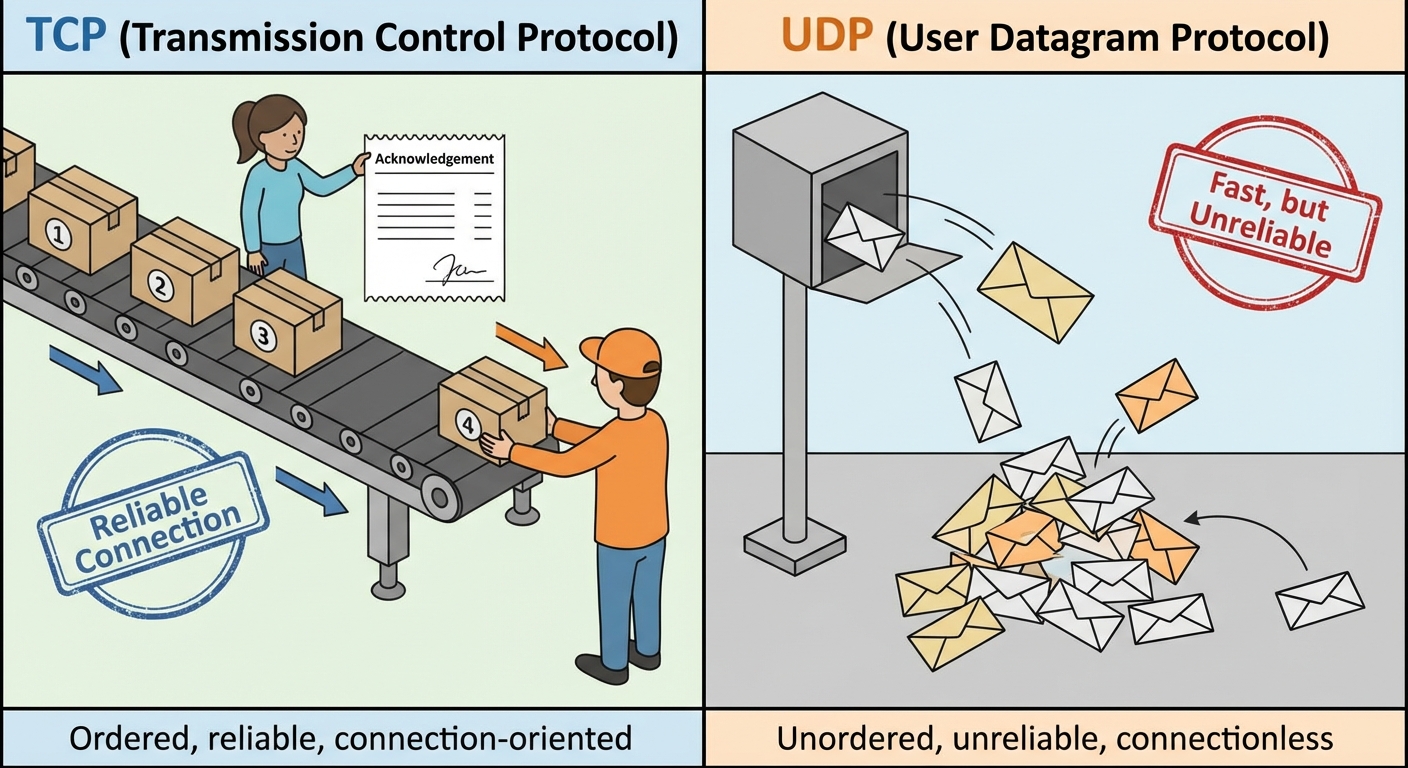
Think of TCP like sending a package through a premium courier service. Before shipping, you establish an account (connection). The courier tracks every package, ensures delivery in order, gets a signature (acknowledgment), and will resend anything that gets lost. It's slower and more expensive than dropping a letter in a mailbox, but you have guarantees.
How TCP Works
TCP's reliability comes from several mechanisms working together:
The Three-Way Handshake
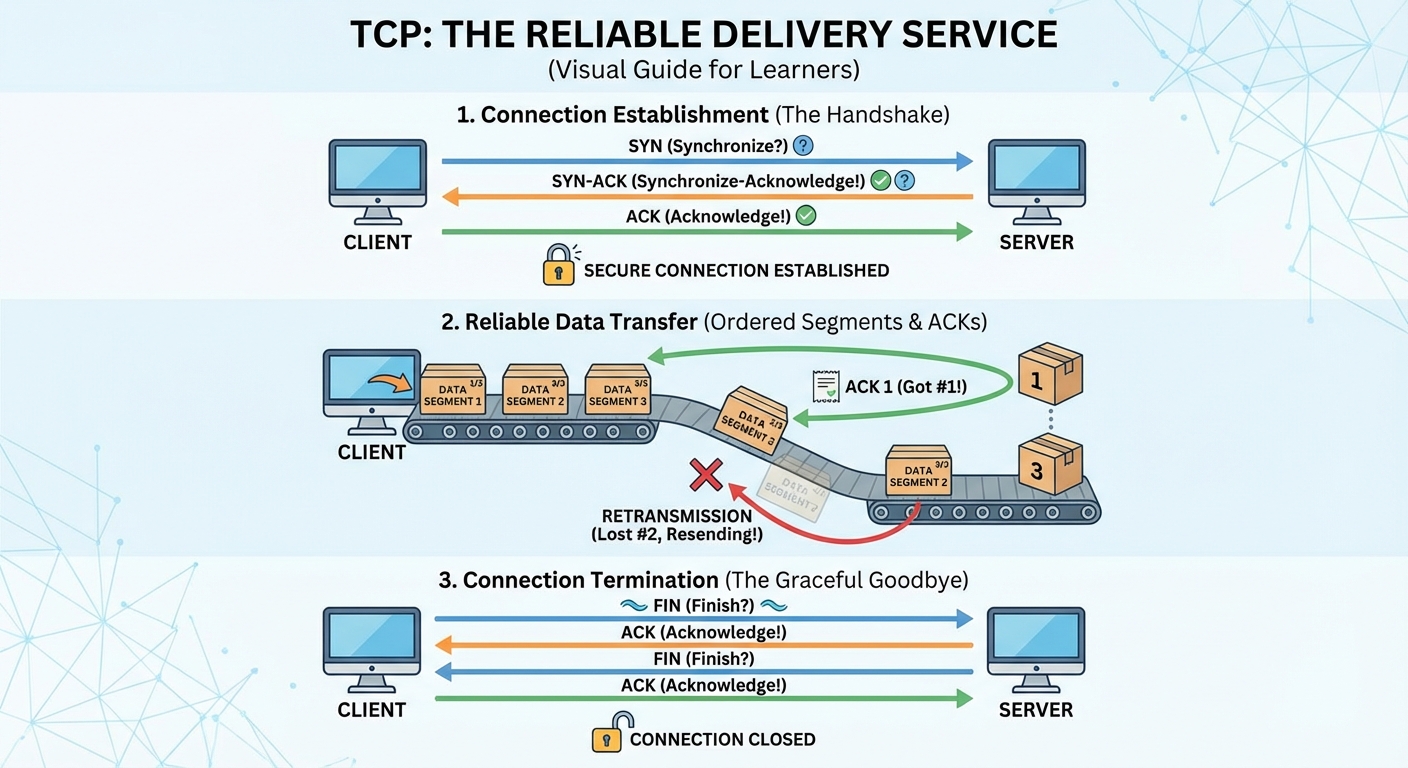
Before any data is transmitted, TCP establishes a connection through a process called the three-way handshake. This ensures both sides are ready to communicate. First, the client sends a SYN (Synchronize) packet to the server, essentially saying "I'd like to establish a connection." The server responds with a SYN-ACK (Synchronize-Acknowledge) packet, acknowledging the request and indicating it's ready to communicate. Finally, the client sends an ACK (Acknowledge) packet, confirming the connection is established. Only after this handshake completes does actual data transmission begin. This process adds overhead but ensures both parties are synchronized and ready.
Sequencing and Ordering
TCP assigns a sequence number to every segment of data it sends. The receiving end uses these numbers to reassemble data in the correct order, regardless of how packets actually arrived. If packet 3 arrives before packet 2, TCP holds packet 3 until packet 2 arrives, then delivers them in order to the application.
Acknowledgments and Retransmission
For every segment received, TCP sends an acknowledgment back to the sender. If the sender doesn't receive an acknowledgment within a certain timeframe, it assumes the segment was lost and retransmits it. This continues until the segment is successfully delivered or the connection times out.
Flow Control
TCP implements flow control through a mechanism called the sliding window. The receiver tells the sender how much data it can handle at once (its buffer size), and the sender limits transmission accordingly. This prevents a fast sender from overwhelming a slow receiver.
Error Checking
Every TCP segment includes a checksum—a mathematical value calculated from the segment's contents. The receiver performs the same calculation and compares results. If they don't match, the segment is discarded and will be retransmitted.
TCP Header Structure
The TCP header is relatively large at 20-60 bytes, reflecting its complexity. The header contains source and destination ports (16 bits each) to identify the sending and receiving applications. The sequence number field (32 bits) tracks the position of the first byte in each segment, while the acknowledgment number (32 bits) indicates the next expected byte from the other side. Nine flag bits control the connection, including SYN, ACK, FIN, and RST. The window size field (16 bits) enables flow control by communicating how much data the receiver can accept. A 16-bit checksum provides error detection, and variable-length options fields allow for additional features like maximum segment size negotiation.
Advantages of TCP
TCP offers several compelling benefits. Its reliability guarantees delivery through automatic retransmission of lost packets. Ordered delivery ensures data arrives in the exact sequence it was sent. Built-in error detection identifies and discards corrupted data. Flow control prevents network congestion and protects receivers from being overloaded. Finally, explicit connection management provides clear establishment and termination of communication sessions.
Disadvantages of TCP
These guarantees come at a cost. TCP introduces higher overhead because the header is larger and acknowledgments consume bandwidth. Performance is slower due to the handshake, acknowledgments, and potential retransmissions adding latency. Head-of-line blocking means that if one packet is lost, subsequent packets must wait even if they've already arrived. These delays make TCP unsuitable for real-time applications where the reliability mechanisms would cause unacceptable latency.
Common Protocols Using TCP
TCP serves as the foundation for protocols where data integrity is paramount. FTP uses TCP on ports 20-21 because file transfers must be complete and accurate—a corrupted download is useless. SSH on port 22 requires reliable communication for secure remote sessions where every keystroke matters. Telnet on port 23 needs ordered command delivery for terminal sessions to function correctly. SMTP on port 25 ensures emails arrive complete, while POP3 on port 110 and IMAP on port 143 require complete message retrieval for email to be useful. HTTP on port 80 and HTTPS on port 443 depend on TCP because web pages must load correctly with every resource intact. SMB on port 445 needs accurate transfers for file sharing to work, and RDP on port 3389 requires reliable communication for remote desktop sessions to remain synchronized.
UDP: The Speed-First Protocol
What is UDP?
The User Datagram Protocol is a connectionless protocol that prioritizes speed over reliability. UDP makes no guarantees about delivery, ordering, or data integrity—it simply sends data and hopes for the best.
If TCP is like a premium courier service, UDP is like shouting across a crowded room. Your message might get through clearly, it might arrive garbled, or it might not arrive at all. But it's fast, and sometimes speed matters more than perfection.
How UDP Works
UDP's simplicity is its greatest strength. Here's what it does—or rather, what it doesn't do.
No Connection Establishment
UDP doesn't perform a handshake. When an application wants to send data, UDP immediately packages it into a datagram and sends it. This eliminates the round-trip delay of connection setup.
No Acknowledgments
UDP doesn't wait for confirmation that data arrived. It sends and moves on. This means no waiting for ACKs and no retransmission delays.
No Ordering
UDP doesn't track sequence numbers. Datagrams may arrive in any order, and UDP doesn't attempt to reorder them. If ordering matters, the application must handle it.
No Flow Control
UDP sends data as fast as the application provides it, without regard for whether the receiver can keep up.