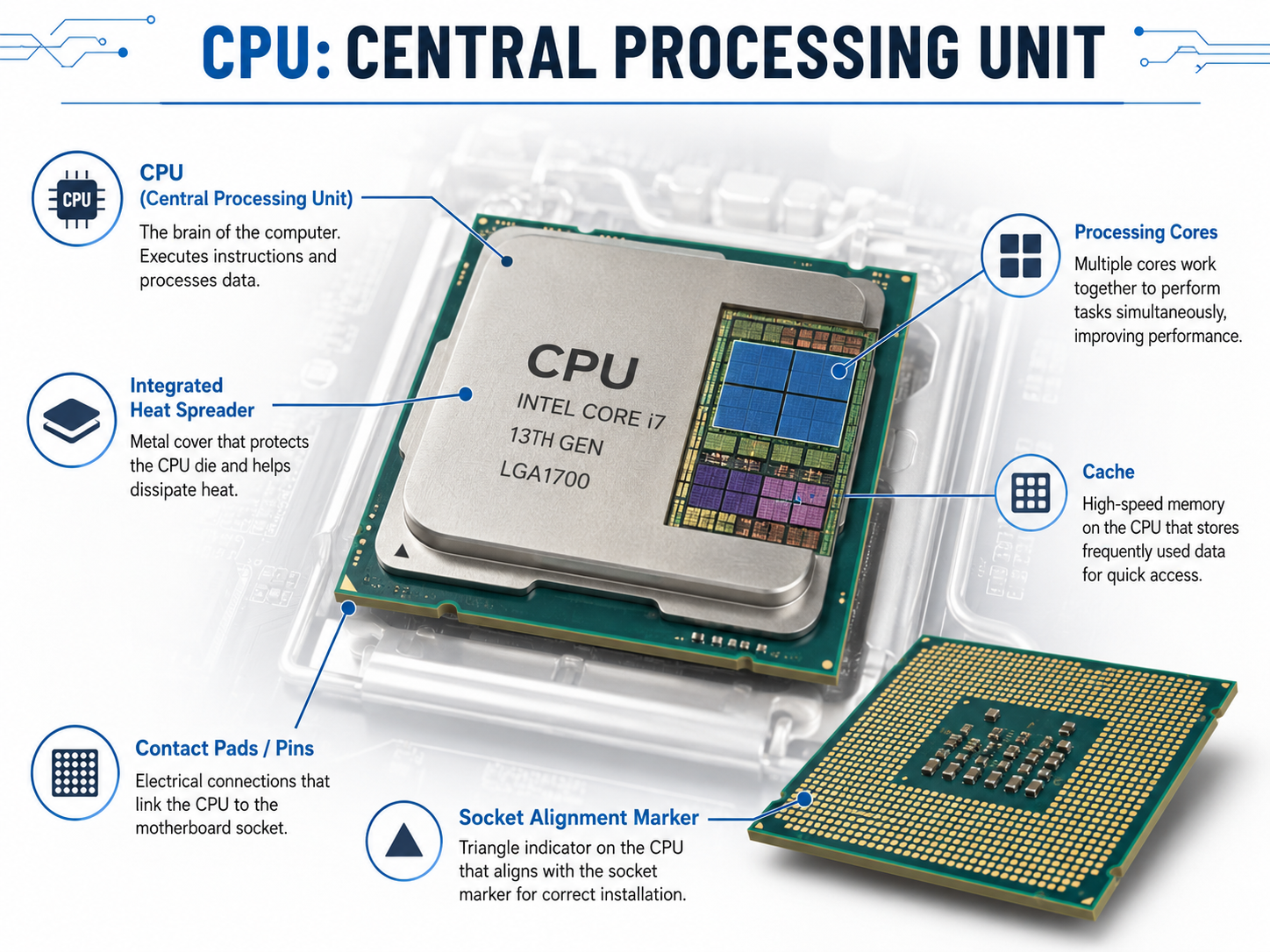
The CPU, or central processing unit, is one of the most important parts of a computer. It is often called the “brain” of the computer because it performs calculations, processes instructions, and helps control the work being done by the system.
Every time a user opens an application, clicks a button, loads a website, plays a video, or runs a program, the CPU is involved. The CPU takes instructions from software, processes them, and sends results to other parts of the computer. Without a CPU, the computer would not be able to run programs or complete tasks.
What Does the CPU Do?
The CPU’s main job is to process instructions. Software is made of instructions that tell the computer what to do. The CPU reads those instructions, performs the required work, and moves data where it needs to go.
For example, when a user opens a web browser, the CPU helps load the application, process the user’s input, handle data from the network, and display the results on the screen. When a user types in a document, the CPU helps process each keystroke and update the document. When a user opens a file, the CPU helps coordinate communication between the storage drive, memory, operating system, and application.
The CPU does not work alone. It constantly communicates with RAM, storage, the motherboard, the graphics system, and other components. The motherboard provides the connection path that allows the CPU to communicate with the rest of the computer.
CPU and the Motherboard
The CPU is installed into a special area on the motherboard called the CPU socket. The socket physically holds the CPU in place and provides the electrical connections needed for communication.
CPU compatibility is very important. Not every CPU works with every motherboard. The motherboard must have the correct socket type, chipset support, firmware support, and power design for the CPU being installed.
For example, an AMD CPU and an Intel CPU usually require different motherboard sockets. Even within the same brand, different generations of CPUs may use different sockets or require a different chipset. This is why an IT technician should always check the motherboard documentation before replacing or upgrading a CPU.
A CPU may physically look similar to another CPU, but that does not mean it is compatible. Installing an incompatible CPU can prevent the computer from starting, damage components, or simply fail to fit into the socket.
CPU Cores
Modern CPUs contain processing units called cores. A core is like an individual worker inside the CPU. A CPU with more cores can handle more tasks at the same time, depending on the software being used.
A dual-core CPU has two cores. A quad-core CPU has four cores. Some modern CPUs have six, eight, twelve, sixteen, or even more cores. More cores can improve performance when running multiple applications or software designed to use many cores.
For example, video editing, virtualization, gaming, programming, and large data processing can benefit from more CPU cores. Basic tasks like web browsing, email, and word processing usually do not need as many cores.
However, more cores do not automatically mean a computer will feel faster in every situation. Software must be able to use those cores effectively. Other parts of the system, such as RAM and storage, also affect performance.
CPU Speed
CPU speed is commonly measured in gigahertz, or GHz. This measurement refers to how many cycles the CPU can perform per second. In simple terms, a higher clock speed can allow a CPU to process instructions faster.
For example, a CPU running at 4.0 GHz can perform more cycles per second than a CPU running at 2.0 GHz. However, clock speed is not the only factor that determines performance. CPU architecture, number of cores, cache size, power limits, cooling, and workload type all matter.
This means a newer CPU with a lower clock speed may still outperform an older CPU with a higher clock speed. Technicians should avoid judging CPU performance by GHz alone.
CPU Architecture
CPU architecture refers to the design of the CPU and the type of instructions it can process. Two important CPU architecture concepts for beginning IT students are x86/x64 and ARM.
The x86 and x64 architectures are commonly used in desktop and laptop computers.