Wireless channels are the foundation of Wi-Fi communication. When you connect to a wireless network, your device communicates with the access point on a specific channel within a designated frequency band. Understanding how channels work, how they are regulated, and how to select them properly is essential knowledge for the CompTIA A+ 1201 exam and for troubleshooting real-world wireless networks.
Think of wireless channels like lanes on a highway. Just as multiple lanes allow more cars to travel simultaneously without colliding, multiple channels allow different wireless networks to operate in the same area without interfering with each other. However, unlike highway lanes, wireless channels can overlap, creating interference that degrades network performance.
Understanding Wireless Channels
What Is a Channel?
A wireless channel is a specific portion of the radio frequency spectrum designated for wireless communication. Each channel occupies a defined range of frequencies measured in Megahertz (MHz). When a wireless access point broadcasts on a particular channel, it uses that specific frequency range to send and receive data.
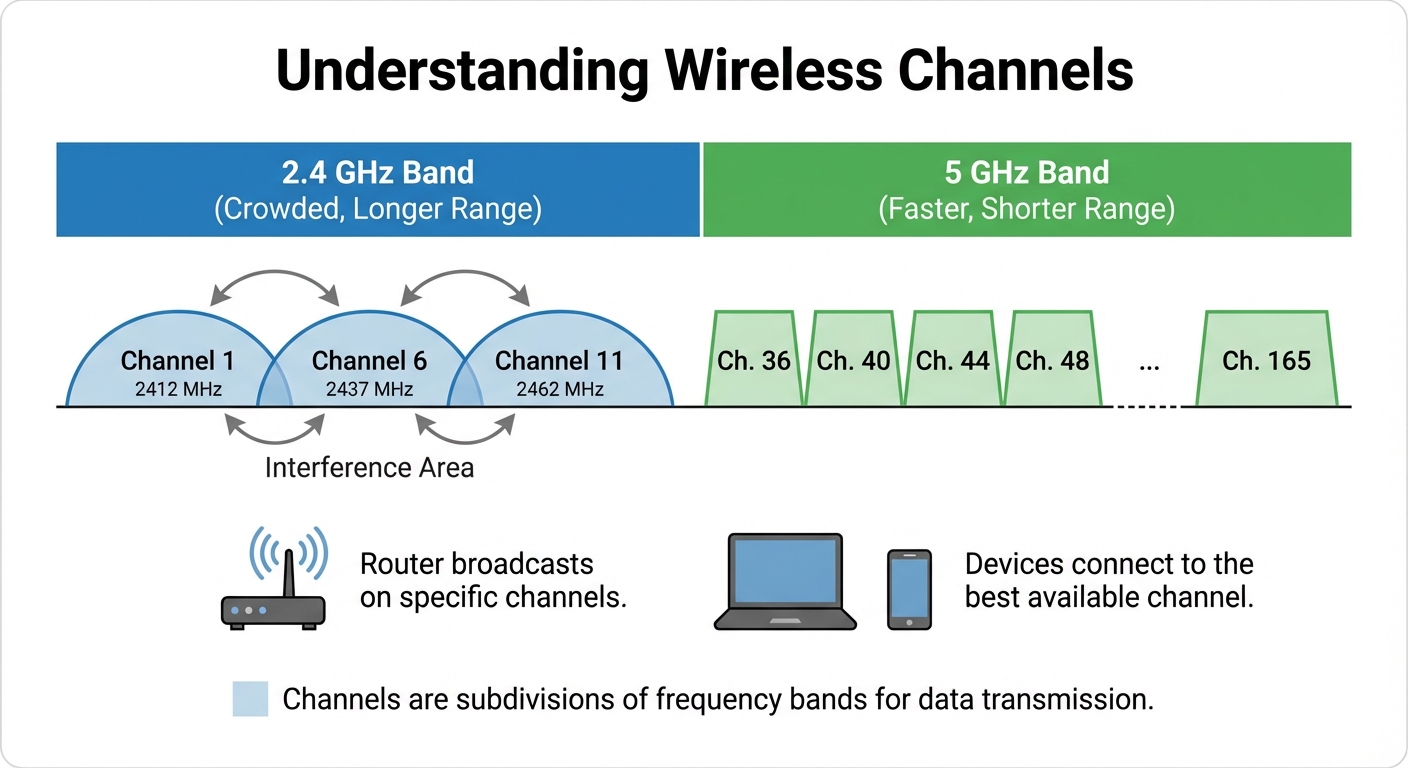
Channels are numbered for easy identification. For example, in the 2.4GHz band, channels are numbered 1 through 14 (though not all are available in every country). In the 5GHz band, channels have numbers like 36, 40, 44, 48, and so on. The 6GHz band introduces even more channels with numbers starting at 1 and extending well beyond 200.
How Channels Relate to Frequencies
Each channel corresponds to a center frequency. The channel number is essentially a shorthand reference to that frequency. In the 2.4GHz band, channel 1 has a center frequency of 2.412 GHz, channel 6 centers at 2.437 GHz, and channel 11 centers at 2.462 GHz. In the 5GHz band, channel 36 corresponds to 5.180 GHz, channel 44 to 5.220 GHz, and channel 149 to 5.745 GHz. The channel extends above and below this center frequency based on the channel width being used.
Regulatory Bodies and Channel Regulations
Why Regulations Exist
Radio frequencies are a shared, limited resource. Without regulation, wireless devices would interfere with each other constantly, and critical services like aviation, emergency communications, and military operations could be disrupted. Regulatory bodies establish rules that govern which frequencies can be used, at what power levels, and under what conditions.
Major Regulatory Organizations
The Federal Communications Commission, known as the FCC, governs wireless communications in the United States. The FCC determines which channels are available, maximum transmission power, and special requirements like DFS.
The European Telecommunications Standards Institute, or ETSI, sets wireless standards for European countries. ETSI regulations differ from FCC rules, which is why channel availability varies between the US and Europe.
Industry Canada, abbreviated as IC, regulates wireless spectrum in Canada. Their regulations generally align closely with FCC regulations but have some differences. Other countries have their own regulatory agencies, including Japan's MIC and Australia's ACMA, each with specific rules for their regions.
EXAM TIP: The CompTIA A+ exam focuses primarily on FCC regulations since it is a US-based certification. Remember that channel availability and power limits vary by country.
Regulatory Differences by Region
In the United States under FCC regulations, channels 1 through 11 are available in the 2.4GHz band, full 5GHz availability is permitted with DFS requirements on certain channels, and the 6GHz band has been approved for Wi-Fi use. European countries operating under ETSI regulations have access to channels 1 through 13 in the 2.4GHz band, along with full 5GHz and approved 6GHz access. Japan permits channels 1 through 14 in the 2.4GHz band with partial 5GHz availability and approved 6GHz use. Australia follows similar patterns to Europe with channels 1 through 13 available in 2.4GHz.
Power Regulations
Regulatory bodies also limit transmission power to prevent interference. Power is measured in milliwatts (mW) or decibels relative to one milliwatt (dBm). Under FCC rules, typical power limits include 1000 mW (30 dBm) EIRP for 2.4GHz indoor use, 200 mW (23 dBm) for the 5GHz UNII-1 sub-band, and 1000 mW (30 dBm) for the 5GHz UNII-3 sub-band. The 6GHz band permits 250 mW for Low Power Indoor devices, with higher limits available for Standard Power operations that use AFC.
EXAM TIP: EIRP stands for Effective Isotropic Radiated Power, which combines transmitter power and antenna gain. This is the actual power radiated by the antenna system.
Channel Selection
The Importance of Proper Channel Selection
Selecting the right channel is crucial for optimal wireless performance. Poor channel selection leads to co-channel interference, which occurs when multiple networks operate on the same channel, and adjacent channel interference, which happens when networks use overlapping channels. Both types of interference reduce throughput, increase latency, and cause connection instability.
2.4GHz Channel Selection
The 2.4GHz band presents the greatest channel selection challenge due to channel overlap. Each channel is 22MHz wide, but channels are spaced only 5MHz apart. This means adjacent channels overlap significantly.
To visualize this, imagine channel 1 occupying a specific frequency range. Channel 2 starts just 5MHz higher, meaning most of its frequency range overlaps with channel 1. This pattern continues across all channels. Channel 3 overlaps with both channels 1 and 2. Channel 4 overlaps with channels 2 and 3, and so on throughout the band.
Because of this overlap pattern, only channels 1, 6, and 11 have no overlap with each other. These are the only three channels you should use in the 2.4GHz band. The five-channel gap between each of these non-overlapping channels provides enough frequency separation to prevent interference.
The 1, 6, 11 Rule: In any environment with multiple 2.4GHz access points, use only channels 1, 6, and 11. Using any other channel, such as channel 3 or 9, will cause interference with networks on multiple adjacent channels.
EXAM TIP: This is one of the most frequently tested wireless concepts. Never use channels other than 1, 6, or 11 in the 2.4GHz band when deploying multiple access points.
Common mistakes to avoid include using channel 3 or 8 thinking they provide separation when they actually overlap with both neighboring non-overlapping channels. Another mistake is setting access points to automatic channel selection, which may choose overlapping channels. Additionally, using the same channel on adjacent access points in the same physical space creates co-channel interference.
5GHz Channel Selection
The 5GHz band offers significantly more flexibility with up to 25 non-overlapping channels when using 20MHz width. Channels are organized into sub-bands called UNII bands, which stands for Unlicensed National Information Infrastructure.
The UNII-1 sub-band spans 5.150 to 5.250 GHz and includes channels 36, 40, 44, and 48. These channels are designated for indoor use only with lower power limits, and they do not require DFS.
The UNII-2A sub-band covers 5.250 to 5.350 GHz with channels 52, 56, 60, and 64. These channels require DFS and may experience radar interference.
The UNII-2C sub-band, also called UNII-2 Extended, spans 5.470 to 5.725 GHz and includes channels 100 through 144. This represents the largest block of 5GHz spectrum. DFS is required because weather radar operates in this range.
The UNII-3 sub-band covers 5.725 to 5.850 GHz with channels 149, 153, 157, 161, and 165. No DFS is required in this sub-band, and higher power is allowed. These channels are often congested because users and devices prefer them to avoid DFS complications.
EXAM TIP: DFS, which stands for Dynamic Frequency Selection, requires access points to monitor for radar signals and vacate the channel if radar is detected. This can cause brief network disruptions.
6GHz Channel Selection
The 6GHz band provides the cleanest channel selection environment with all channels non-overlapping at their respective widths. Channels are organized into four sub-bands. UNII-5 covers 5.925 to 6.425 GHz with channels 1 through 93. UNII-6 spans 6.425 to 6.525 GHz with channels 97 through 113. UNII-7 covers 6.525 to 6.875 GHz with channels 117 through 181. UNII-8 spans 6.875 to 7.125 GHz with channels 185 through 233.
The 6GHz band uses Automated Frequency Coordination, known as AFC, for standard power operations. AFC protects existing licensed users of the spectrum by checking a database and assigning channels that will not cause interference.
Channel Selection Best Practices
First, survey the environment before making channel assignments. Use a Wi-Fi analyzer tool to see which channels are already in use by neighboring networks.